

Product Code: SP-139
Because of its high pace, this is a true bootcamp, which consists of two components, i.e. both the clinical and IT skills needed to support medical imaging and IT systems such as PACS, EHR and other image intensive systems. The curriculum follows the requirements of the Certified PACS Associate (CPAS) (see pacsadmin.org for details).
Product Code: SP-140
4 Day Seminar combining the PACS Certification (CPAS) Boot Camp and the Advanced DICOM, HL7 and IHE seminar.
Product Code: SP-151
This one-day course is a must for imaging professionals seeking a high level understanding of the PACS system, its related clinical workflow and fundamentals, rudimentary exposure to the DICOM and HL7 standards which are integral to imaging support and workflow issues. It is a pragmatic, non-technical introductory course covering "everything you wanted to know but did not dare to ask" for those who are somewhat involved, or would like to get more involved with PACS systems from a support or administrative level.
Product Code: SP-152
This one-day course is a must for healthcare IT professionals where are seeking to get a basic understanding of the healthcare imaging and IT standards and its context and impact in the healthcare enterprise. Each standard has its own domain and provides unique benefits to a certain part of the enterprise, impacting workflow and efficiency while enabling end users to integrate systems from multiple vendors. i.e. allowing best-of-breed solutions. When pursuing this multi-vendor open standards approach, one needs to make sure that the systems truly support open standards to make sure that they are interchangeable and can be replaced in the future without significant migration costs.
Product Code: SP-133
Because of its high pace, this is a true bootcamp, which consists of two components, i.e. both the clinical and IT skills needed to support medical imaging and IT systems such as PACS, EHR and other image intensive systems.
Product Code: SS-105
This advanced seminar teaches both advanced technical skills and troubleshooting skills. A base knowledge of DICOM and HL7 is required to get optimal benefit from this seminar. The interface standards will be briefly described in the form of a "refresher", as the emphasis is on the hands-on component and doing the exercises.
Product Code: SS-138
This course provides you with a thorough understanding of all the aspects of a typical PACS System, including its architecture and new developments such as VNA and dose reporting. We will cover the DICOM, HL7 and IHE standards as well as image quality topics. This is a hands-on class, please bring your laptop to perform the exercises using HL7 and DICOM message simulators.
Product Code: WP-101
This high paced web-based seminar teaches the essential components of the PACS architecture and how it relates to the workflow and its interaction with its environment, i.e. a hospital and/or departmental information system, acquisition modalities, enterprise archive, electronic health record and health information exchange.
Product Code: SP-138
This 3-day seminar teaches both the clinical and IT skills needed to support medical imaging and IT systems such as PACS, EHR and other image intensive systems. The curriculum follows the updated requirements of the Certified PACS Associate (CPAS2014).
Product Code: SS-139
This hands-on seminar covers the IHE profiles that are used to optimize workflow in imaging such as radiology and cardiology, and to communicate between PACS and/or a Vendor Neutral Archive (VNA) and EMR's either direct or through a Health Information Exchange (HIE).
Product Code: SP-141
Students will get to understand the role of new PACS architectures, aka PACS 2.0 which includes a VNA and exchange with external information exchanges using IHE protocols. They will understand the role of the HIE (Health Information Exchange) and which IHE standards are used to exchange information between hospitals using HIE?s and direct communications. There will also a refresher of DICOM and HL7 applicable to the transactions used for the HIE communication.
Product Code: SP-142
This 4-day seminar consists of a 3 day PACS certification and one day PACS advanced training. You can take either the first and/or second training separately. The PACS certification teaches both the clinical and IT skills needed to support medical imaging and IT systems such as PACS, EHR and other image intensive systems. The curriculum follows the updated requirements of the Certified PACS Associate (see pacsadmin.org for details).
Product Code: SP-143
This track consists of two components, covering both the clinical and IT skills needed to support medical imaging and IT systems such as PACS, EHR and other image intensive systems. The curriculum follows the requirements of the Certified PACS Associate (CPAS) (see pacsadmin.org for details).
Product Code: SP-144
This one-day advanced PACS training seminar is part of the Imaging Track. Students will get to understand the role of new PACS architectures, aka PACS 2.0 which includes a VNA and exchange with external information exchanges using IHE protocols. They will understand the role of the HIE (Health Information Exchange) and which IHE standards are used to exchange information between hospitals using HIE?s and direct communications. There will also a refresher of DICOM and HL7 applicable to the transactions used for the HIE communication
Product Code: SP-145
This two-day PACS project management course applies the project management skills towards healthcare imaging and IT projects such as implementing an EMR, PACS, or any other new IT project. The student will be able to manage a healthcare IT implementation.
Product Code: SP-146
The PACS healthcare imaging consists of the two-day track teaches you the basic skills to become a PACS certified professional (PARCA - CPAS), followed by an advanced one day PACS training and a two day PACS project management course.
Product Code: SP-147
This HL7 version 2 training is a two day seminar can be taken separately or as a part of the Healthcare Standards (DICOM/HL7/IHE) track.
Product Code: SP-148
This one day seminar on the new FHIR HL7 standard can be taken separately or as a part of the Healthcare Imaging (PACS) and a Healthcare Standards (DICOM/HL7/IHE) track.
Product Code: SP-149
This two day advanced DICOM/HL7 troubleshooting class can be taken separately or as a part of the Healthcare Standards (DICOM/HL7/IHE) track.
Product Code: SP-150
The Healthcare Standards track contains a two day HL7 version 2 training followed by a one day seminar on the new FHIR HL7 standard and a two day advanced DICOM/HL7 troubleshooting class.
Product Code: SS-106
This class provides an in-depth discussion of PACS and the related DICOM and HL7 interface standards which are used to exchange information between the different PACS, RIS, EMR, Voice recognition components, and imaging modalities such as CT, MR, CR, DR, cardiology and others. This is a hands-on course as the emphasis is on the practicing component and doing the exercises using software that is part of the course.
Product Code: SS-140
TRAINING WORKSHOP - FHIR/XDS/PACS/DICOM/HL7
Product Code: AI-101
This high paced web-based seminar teaches the essential components of AI in healthcare. It explains the fundamentals of AI, i.e. how it is based on Machine Learning and Deep learning and how AI algorithms are categorized. It discusses the different data set collections that are needed, standard implementations such as DICOM and IHE as well as regulatory considerations.
Product Code: CS-101
This high paced web-based seminar teaches the essential components of Cyber Security in healthcare. It explains the fundamentals of Cyber Security, i.e. what is it, where does it apply, who does these attacks and why, how to deal with them and the potential impact.
Product Code: SP-154
This on-line bootcamp consists of two components, i.e. both the clinical and IT skills needed to support medical imaging and IT systems such as PACS, EHR and other image intensive systems.
Product Code: SP-102
The PACS System Administration training course is designed to provide in-depth knowledge and skills required to successfully manage and maintain a Picture Archiving and Communication System (PACS) environment.
Product Code: SP-153
The first in a series of Healthcare IT Innovation seminars will be conducted as a webinar and has the topic "VNA Requirements and implementation experiences".
Product Code: SP-156
You will get a thorough understanding of all the aspects of a typical PACS System Administrator's job. In addition, one gains the technical background that allows one to do his or her job in a knowledgeable manner. Our seminars are limited with regard to the attendance and is very interactive with a great deal of hands-on throughout the week.
Product Code: SD-103
As an integral part of the lecture, participants will have access to a virtual hospital simulator based in the cloud that will allow for students to simulate real time transactions.
Product Code: WD-101
This high paced web-based seminar teaches the essential components of the DICOM standard, its protocol and data format (header), and how to resolve any interface issues with devices using this interface standard.
Product Code: WD-108
This high paced web-based seminar teaches the essential components of the DICOM troubleshooting.
Product Code: WD-102
This is an intensive on-line, instructor lead, DICOM training which covers the current DICOM standard and concentrates on the new developments and additions. It is targeted towards software developers, system integrators and testers that either have some limited knowledge of the DICOM standard, or will come up to speed using the study materials which are provided prior to the seminar (DICOM Basics textbook with specific reading assignments).
Product Code: WD-103
This is an intensive on-line, instructor lead, DICOM training which covers the current DICOM standard and covers all the requirements to get DICOM certified. It is delivered using a virtual classroom (GoToMeeting) thereby allowing interaction with the students. It is delivered in a 4 times 4 hour webcast, split up in one hour units. It is targeted towards software developers, PACS administrators, interface analysts, and system integrators. You might have some limited knowledge of DICOM, but this certification class rounds you off to become knowledgeable about its details, including the latest enhancements and changes.
Product Code: WD-104
This is an intensive on-line, instructor lead, DICOM training which covers the current DICOM standard and covers all the requirements to get DICOM certified. It is delivered using a virtual classroom (GoToMeeting) thereby allowing interaction with the students. It is delivered in a 4 times 4 hour webcast, split up in one hour units. It is targeted towards software developers, PACS administrators, interface analysts, and system integrators. You might have some limited knowledge of DICOM, but this certification class rounds you off to become knowledgeable about its details, including the latest enhancements and changes. All exam and member fees to allow the student to take the certification exam are included in the cost of the seminar.
Product Code: WD-105
This is an intensive on-line, instructor lead, DICOM training which covers the current DICOM standard and covers all the requirements to get DICOM certified. It is delivered using a virtual classroom (GoToMeeting) thereby allowing interaction with the students. It is delivered in a 4 times 4 hour webcast, split up in one hour units. It is targeted towards software developers, PACS administrators, interface analysts, and system integrators. You might have some limited knowledge of DICOM, but this certification class rounds you off to become knowledgeable about its details, including the latest enhancements and changes. All exam and member fees to allow the student to take the certification exam are included in the cost of the seminar.
Product Code: WD-106
This is an intensive on-line, instructor lead, DICOM training which covers the current DICOM standard and covers all the requirements to get DICOM certified. It is delivered using a virtual classroom (GoToMeeting) thereby allowing interaction with the students. It is delivered in a 4 times 4 hour webcast, split up in one hour units. It is targeted towards software developers, PACS administrators, interface analysts, and system integrators. You might have some limited knowledge of DICOM, but this certification class rounds you off to become knowledgeable about its details, including the latest enhancements and changes. All exam and member fees to allow the student to take the certification exam are included in the cost of the seminar.
Product Code: WD-107
This is an intensive on-line, instructor lead, DICOM training which covers the current DICOM standard and covers all the requirements to get DICOM certified. It is delivered using a virtual classroom (GoToMeeting) thereby allowing interaction with the students. It is delivered in a 4 times 4 hour webcast, split up in one hour units. It is targeted towards software developers, PACS administrators, interface analysts, and system integrators. You might have some limited knowledge of DICOM, but this certification class rounds you off to become knowledgeable about its details, including the latest enhancements and changes. All exam and member fees to allow the student to take the certification exam are included in the cost of the seminar.
Product Code: SH-104
You will get a basic understanding of the HL7® version 2 and FHIR standard and learn to generate and troubleshoot HL7® messages using a simple but powerful software tool. Much of the operation of a healthcare enterprise relies on administrative and/or order information generated by HL7® messages. In addition, results captured as part of the Electronic Patient Record also depend on imaging as a source for their information. Therefore, all relevant HL7® messages will be explained in detail using a real-life scenario. Several transactions from the IHE technical framework will be described as well
Product Code: WH-101
This high paced web-based seminar teaches the essential components of the HL7® Version 2.
Product Code: SH-107
This is especially useful for implementers, service/support engineers, and system administrators. Not only will you get an introduction of the HL7 standard, you will get to do hands-on exercises and look at messaging.
Product Code: WH-102
This seminar teaches the fundamental components of the HL7 FHIR standard.
Product Code: WH-103
This high paced web-based seminar provides an introduction to the HL7® FHIR® standard.
Product Code: WH-104
This high paced web-based seminar teaches the essential core components of the HL7® Version 2 and FHIR® standard.
Product Code: WH-105
This high paced advanced web-based seminar teaches cyber security and AI essentials.
Product Code: B-104ebk
Note: eBooks do not come with a print feature, are compatible with Microsoft Windows only and require Adobe Flash. This is the electronic version of our PACS Fundamentals Book. Provides a basic understanding of PACS technology, as well as lessons learned from those who have used it for many years.
Price: $45.00 Add to Cart
Product Code: B-105ebk
Note: eBooks do not come with a print feature, are compatible with Microsoft Windows only and require Adobe Flash. This is the electronic version of our DICOM Basics, Third Edition Book. A reference book for those who would like to understand the basics of the Digital Imaging and Communications (DICOM) standard.
Price: $45.00 Add to Cart
Product Code: B-112ebk
Note: eBooks do not come with a print feature, are compatible with Microsoft Windows only and require Adobe Flash.This is the electronic edition of our HL7 Messaging, Version 2 Book. The second edition of this book improves on the previous edition in that it is up to date with the most current version (2.5), it is written around a true patient encounter, and also has an additional V2.5 and XML encoding example for lab results.
Price: $45.00 Add to Cart

Product Code: UB-208ebk
This comprehensive study guide provides professionals with a tool to expand their knowledge in the field of Health Imaging and Informatics. The guide is organized using the Certified Imaging and Informatics Professional curriculum as a guide, which is published by the American Board of Imaging and Informatics (ABII, see www.abii.org).
Price: $120.00 Add to Cart
Product Code: UB-203ebk
This second and updated edition of the comprehensive study guide provides professionals with a tool to master the PACS System Analyst skills that are required to support a PACS system. All PARCA (www.pacsadmin.org) CPSA requirements as well as the ASRT exams are covered by this guide.
Price: $95.00 Add to Cart
Product Code: UB-204ebk
This comprehensive study guide (second edition) provides professionals with a tool to master the IT component of the PACS System Associate skills that are required to support a PACS system. All PARCA (www.pacsadmin.org) CPAS IT technical requirements are covered by this guide.
This is the second edition of the study guide which has been updated and greatly expanded to cover the PARCA CPAS 2014 requirements.
Price: $95.00 Add to Cart
Product Code: UB-205ebk
This comprehensive study guide (second edition) provides professionals with a tool to master the clinical component of the PACS System Associate skills that are required to support a PACS system. All PARCA (www.pacsadmin.org) clinical CPAS requirements are covered by this guide.
This is the second edition of the study guide which has been updated and greatly expanded to cover the PARCA CPAS 2014 requirements.
Price: $95.00 Add to Cart
Product Code: UB-212ebk
This comprehensive study guide provides professionals with a tool to master the DICOM integration specialist skills that are required to support, develop and integrate modalities and information systems with a PACS system. This study guide is also included with the self study packages and in addition, is provided when you take one of our on-or off-site classes.
The PARCA CDIP requirements are mapped to the study guide so that potential certification candidates can use this as a guide to prepare for their examinations. All PARCA (see www.pacsadmin.org) DICOM certification requirements are covered by this guide.
Price: $95.00 Add to Cart
Product Code: UB-207ebk
This comprehensive study guide provides professionals with a tool to prepare for the HL7® Version 2 certification exam for up to Version 2.7 as provided by the HL7® organization. This study guide is also included with the self study packages and in addition, is provided when you take one of our on-or off-site classes.
Price: $95.00 Add to Cart
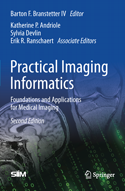
Product Code: 978-1-0716-1755-7
Written by top practitioners in the field, the SIIM Practical Imaging Informatics: Foundations and Applications for Medical Imaging textbook offers a comprehensive, interdisciplinary, and easy-to-use guide to PACS and imaging informatics.
CIIP Study Guide - $120
HL7 Study Guide - $115

Click here to view entire training schedule.
Click here to view the latest video regarding the DICOM sniffer.

Stay Connected